How to Calculate Gold Weight from a Jewellery CAD File
Metal weight is volume × alloy density. Here's the formula, a density chart for 14K, 18K, 22K gold, platinum, palladium and silver, a worked example from a real ring, and the six mistakes that make CAD weights wrong.
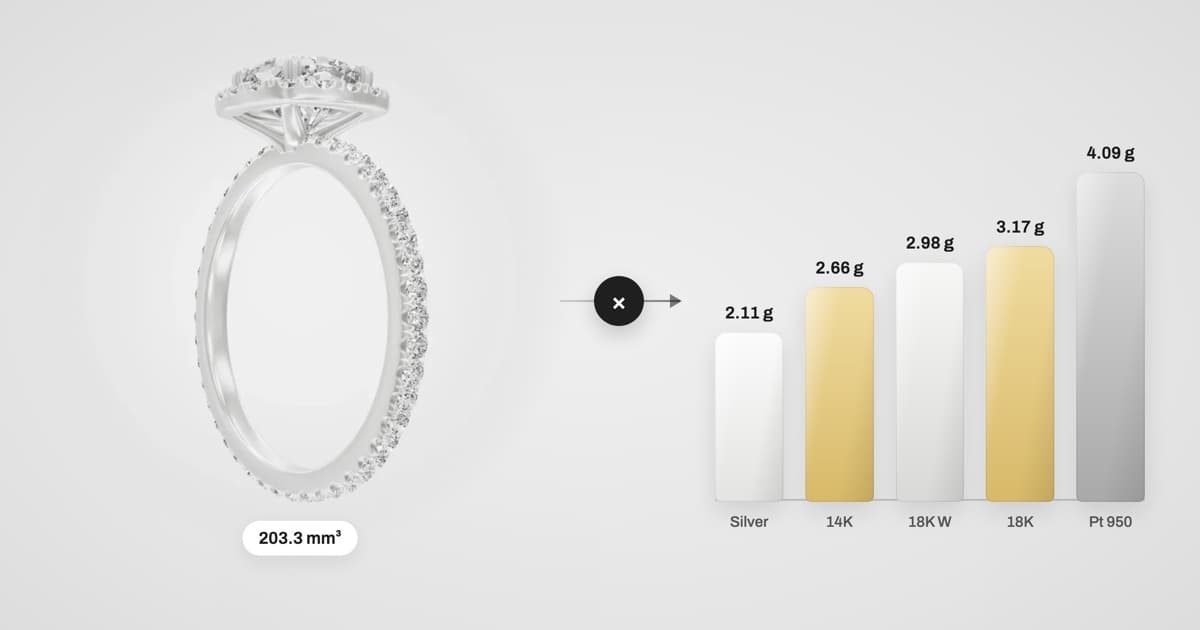
Every quote, every casting order and every client conversation about price starts with one number: how many grams of metal is this piece? If you have the CAD file, you already have everything you need to answer it — accurately, in every alloy, before anything is printed or cast.
The short answer:
Metal weight (g) = volume (mm³) ÷ 1,000 × alloy density (g/cm³)
So a ring with a metal volume of 203.3 mm³ weighs 203.3 ÷ 1,000 × 15.58 = 3.17 g in 18K yellow gold, and 4.09 g in Platinum 950.
The formula is simple. Getting a trustworthy volume out of a jewellery CAD file is where most weights go wrong. This guide covers both: the density chart we use, a worked example from a real production ring, how to get the volume in Rhino or MatrixGold, and the six mistakes that quietly add or remove a gram.
The formula, step by step
Get the metal volume in mm³. This must be the volume of a closed, watertight solid — metal only, with no stones, cutters, sprues or helper geometry.
Convert to cm³. Divide by 1,000 (1 cm³ = 1,000 mm³).
Multiply by the density of the alloy you will cast in. Density is in g/cm³, so the result is in grams.
Because density is the only thing that changes between alloys, one volume gives you the weight in every metal at once. That is what makes CAD such a fast quoting tool: model once, price 14K, 18K and platinum side by side.
Jewellery alloy density chart
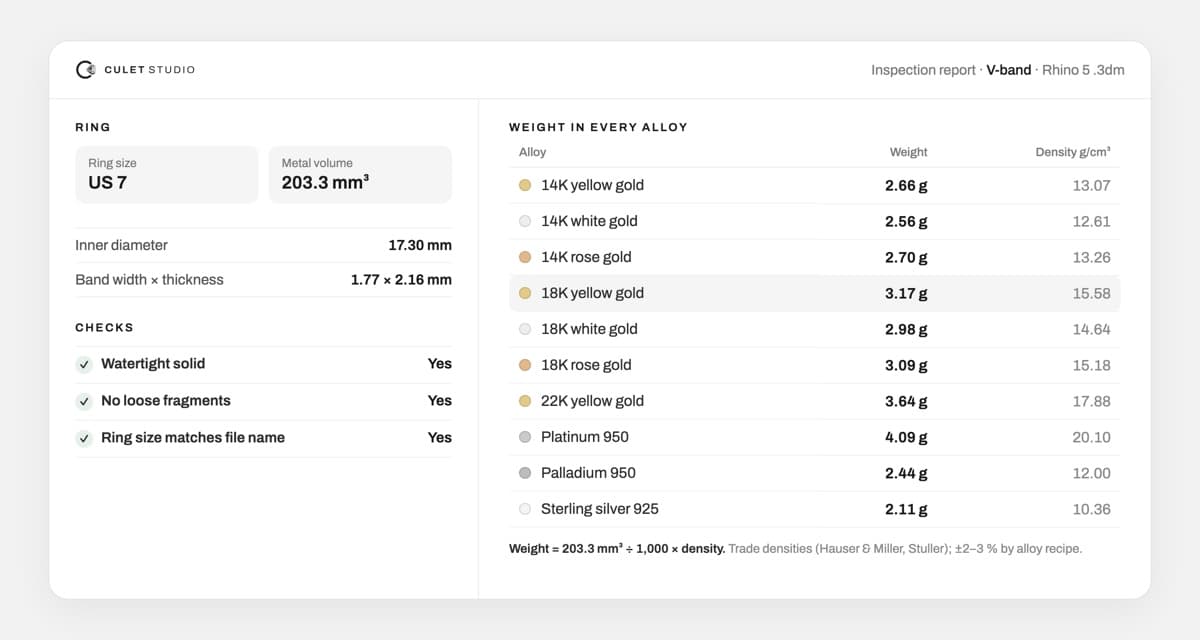
These are the densities Culet Studio uses, from Hauser & Miller and Stuller alloy data (22K from the MatrixGold alloy table). The last column is the weight of our example ring — a plain V-band with 203.3 mm³ of metal.
Alloy | Density (g/cm³) | Example ring (203.3 mm³) | vs 14K yellow |
|---|---|---|---|
14K yellow gold | 13.07 | 2.66 g | — |
14K white gold | 12.61 | 2.56 g | −4 % |
14K rose gold | 13.26 | 2.70 g | +1 % |
18K yellow gold | 15.58 | 3.17 g | +19 % |
18K white gold | 14.64 | 2.98 g | +12 % |
18K rose gold | 15.18 | 3.09 g | +16 % |
22K yellow gold | 17.88 | 3.64 g | +37 % |
Platinum 950 | 20.10 | 4.09 g | +54 % |
Palladium 950 | 12.00 | 2.44 g | −8 % |
Sterling silver 925 | 10.36 | 2.11 g | −21 % |
Two things to notice:
Karat isn't the whole story. White and rose golds of the same karat have different densities because the other metals in the alloy differ. 18K white is about 6 % lighter than 18K yellow for the same design.
Platinum surprises clients. The same ring is over 50 % heavier in Platinum 950 than in 14K yellow — before you even account for the higher price per gram.
Alloy recipes vary between refiners, so treat any published density as accurate to roughly ±2–3 %. If your caster publishes a density for their exact alloy, use theirs. Platinum is a good example: a 950 platinum-ruthenium alloy is denser (around 20.7 g/cm³) than the platinum-cobalt figure above.
How to get the metal volume from your CAD file
In Rhino or MatrixGold
Check the document units are millimetres (a file modelled in inches will be off by a factor of 16,387).
Hide or delete everything that isn't metal: stones, cutters, prong guides, sprues, tie bars, text and reference curves.
Select the metal and run
ShowEdgeswith Naked edges on. Any naked edge means the solid isn't closed — fix it before measuring.Run the
Volumecommand. With several closed objects selected, Rhino reports each one and the total.Apply the formula above for each alloy you want to quote.
From an STL, OBJ or other mesh
Meshes work too, as long as they are closed. A mesh with holes, flipped normals or overlapping shells will give a volume that is wrong, sometimes wildly. Run a mesh check (in Rhino: Check or MeshRepair) before trusting the number. Also remember a mesh is an approximation of the curved surfaces: a coarse export of a NURBS ring can lose or gain a few percent of volume.
Or let the file tell you
This is the check we built Culet Studio's inspection report to do automatically. Drop in a 3DM, STEP, IGES, STL, OBJ, FBX, PLY or GLB file and it finds the closed metal solid, separates stones and production layers, and lists the weight in every common alloy. MatrixGold files saved without render meshes are tessellated directly from the NURBS surfaces, to within 0.2 % of MatrixGold's own volume — and the file is measured in your browser, never uploaded.
Six reasons CAD weights go wrong
When a cast piece comes back heavier or lighter than quoted, it is almost always one of these.
1. The solid isn't watertight
Volume is only defined for a closed object. An open polysurface or a mesh with a single missing face can return zero, a negative number, or the volume of a completely different shape. Always check for naked edges first.
2. Stones and cutters are counted as metal
If the stone objects sit on a visible layer, their volume gets added to the metal. Worse, if the seats were never cut, the metal where the stones should sit is still there. A 1 ct round diamond takes up roughly 57 mm³ of space — about 0.9 g of 18K gold that shouldn't be in your quote.
3. Production geometry is included
Sprues, tie bars, engraving text, support pins and hidden reference shapes are easy to miss in a busy file. MatrixGold files in particular often carry hidden layers. Weight should reflect what will be cast as the finished piece.
4. The units are wrong
A model drawn in inches but read as millimetres (or the reverse) is the most dramatic error — weights off by thousands of times — but also the easiest to spot. Sanity-check that the ring's inner diameter is in the 14–23 mm range.
5. The wrong ring size is in the file
The model on screen may not be the size you are quoting. Every half size changes the bore circumference by about 1.3 mm, so the band's volume changes with it. Confirm the inner diameter matches the order before you price it.
6. The alloy density doesn't match your caster
Using an 18K yellow density for an 18K white order adds about 6 %. Using a generic "gold" density of 19.3 g/cm³ — that's pure 24K gold — adds 24 % or more to an 18K piece. Match the density to the exact alloy and, ideally, to your caster's own figure.
From CAD weight to the metal you actually need
The CAD weight is the weight of the finished, polished piece. Your caster needs more metal than that, and your final piece may come in slightly lighter.
Sprues and button. Casting needs extra metal for the sprue and the button that feeds it. Most casters add a fixed allowance per tree or per piece — ask yours, and keep it separate from the piece weight in quotes.
Finishing loss. Filing, sanding and polishing remove a small amount of metal. It's usually small for clean CAD-to-cast work, but record your own numbers on a few jobs and you'll know your real figure.
Checking against the wax or resin print. If you weigh the printed model, multiply its weight by the ratio of the metal density to the print material's density (from the resin or wax data sheet). Don't assume the material weighs 1 g/cm³ — many castable resins are denser than that.
Using CAD weights to quote faster
Because one volume gives every alloy, CAD weight is the quickest way to give clients real options. A practical habit:
Measure the volume once, after cleaning up the file.
Quote the three metals the client is most likely to choose — say 14K, 18K and platinum — side by side.
Show the weight with the price. Clients understand "3.2 g of 18K gold" far better than a total alone, and it heads off "why does platinum cost so much more?"
Re-check the weight whenever the ring size or design changes.
Try it on your own file
See the metal weight of your CAD in every alloy
Drop in a Rhino, MatrixGold, STEP or STL file and Culet Studio measures the ring size, stones and metal weight per alloy — in your browser, with nothing uploaded.
Frequently Asked Questions
Divide the volume in mm³ by 1,000 to get cm³, then multiply by the alloy's density in g/cm³. For example, 200 mm³ of 18K yellow gold (15.58 g/cm³) weighs 200 ÷ 1,000 × 15.58 = 3.12 g.
About 13.07 g/cm³ for 14K yellow gold and 15.58 g/cm³ for 18K yellow gold. White and rose golds differ slightly: 14K white is about 12.61 and 18K white about 14.64 g/cm³. Exact values depend on the alloy recipe, so use your caster's figure when you have it.
For the same design, Platinum 950 (about 20.1 g/cm³) is roughly 29 % heavier than 18K yellow gold and about 54 % heavier than 14K yellow gold.
The usual causes are an open (non-watertight) model, stones or cutters counted as metal, hidden production geometry, the wrong ring size, or a density that doesn't match your alloy. Sprue metal and finishing loss also change what you weigh on the bench.
Yes. Culet Studio opens 3DM, STEP, IGES, STL, OBJ, FBX, PLY and GLB files in the browser and lists the weight in every common alloy automatically. The file is measured on your computer and isn't uploaded.